Ravenhill: Find Hidden Objects
- 4.4
- Rating
- 1.00M
- Installs
- Free
- Price

 Analysis by App-foxy
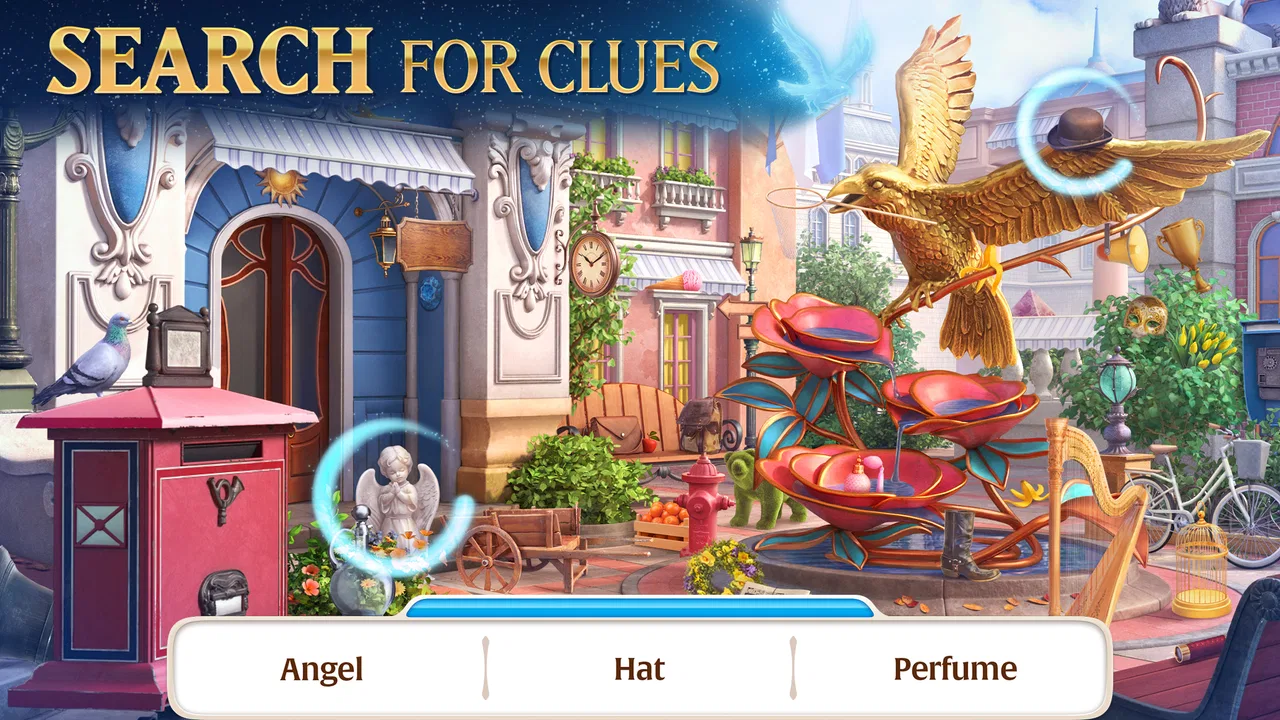
I spent time with Ravenhill: Find Hidden Objects as an adventure game built around careful observation, short puzzle sessions, and a mystery that unfolds through a strange city. It combines hidden-object scenes with match-3 puzzles, so it is not simply a picture-search game. I moved between looking closely for items, solving tile boards, and following the story, which gives the experience more variety than its brief store description suggests.
The game comes from Mytona and is free to start on Android, with optional purchases ranging from $0.99 to $99.99 per item. It is aimed at Teen players, and its central appeal is easy to understand: you investigate locations, search for concealed objects, and use puzzle progress to keep the case moving. I found it most enjoyable when I treated each scene as a calm observation challenge rather than something to rush through.
How Ravenhill works in everyday play
I find Ravenhill easiest to judge by the way it asks me to look closely rather than play quickly. This section focuses on how that search-led rhythm feels in ordinary sessions, from scanning a crowded scene to deciding when to switch tasks. A few small habits can make that process more comfortable, which leads into the practical choices that shape each play session.
You May Also Like

 Google Keep - Notes and lists
Google Keep’s Quiet Growth Shows the Appeal of Simpler Notes
As mobile work gets busier, Google Keep keeps winning a simple contest: capture a thought quickly, find it later, and get on with the day.

 Blood Strike: 2.5 Anniversary
Blood Strike’s Loadouts Turn Every Drop Into a Tactical Gamble
A close look at Blood Strike’s custom loadouts: how fast access to signature weapons reshapes its battle royale rhythm, rewards preparation, and narrows the gap between fights.

 Pandora - Music & Podcasts
Pandora’s Music Is Easy to Start, but Harder to Recover
Pandora’s strength is its low-effort path from a seed to a station. Its weak spot is how much confidence it asks you to place in connection, setup, and quiet recovery.

 8 Ball Pool
 Is Built on Rivalries, Rematches, and Routine
A close look at the rivalries, rematches, shared routines, and unanswered safety questions that turn a quick pool match into a persistent mobile community.

 Samsung Music
’s Quiet Strength Is Playing What You Already Own
Its reach comes less from spectacle than from dependable access to a personal library. That simplicity is both the app’s strongest retention engine and its ceiling.

 AccuWeather: Weather Radar
AccuWeather Review: A Quick, Clear Forecast for Everyday Decisions
For everyday plans, the best forecast is the one you can understand quickly. AccuWeather makes rain timing, radar, and local conditions easy to act on, with a few trade-offs.
More From Our News Desk



Readability and navigation shape the first impression
The opening hours are easy to understand. A location presents a list of objects, and I scan the artwork to find them. Once that search is complete, match-3 challenges and story steps provide a change of pace. The structure makes the game approachable for someone who enjoys visual puzzles but does not want a complicated control scheme or a large set of buttons to memorize.
Navigation is also helped by the fact that the game is organized around a mystery. I usually had a reason to move forward instead of selecting random activities from a disconnected menu. That context matters: when I returned to the game after a break, the investigation gave me a reminder of what I was doing, even if I did not remember every small detail of the previous session.
For readability, the main challenge is not learning the controls but separating small objects from busy backgrounds. Some scenes use detailed artwork, and an item can blend into furniture, walls, shelves, or other decorative elements. I recommend playing on a larger phone screen or tablet when possible, because the extra space makes visual comparison more comfortable. On a compact display, I found myself zooming mentally rather than physically, which can make longer searches tiring.
The game’s visual design supports players who like close inspection, but it may be less comfortable for people with reduced vision or difficulty distinguishing objects from similar colors. I would not choose it as a low-vision-friendly game without trying a scene first. The core task depends on noticing shape, color, and placement, so strong contrast and large interface elements elsewhere cannot fully solve that central demand.
Search scenes reward method more than frantic tapping
One useful habit is to divide each scene into sections. I scan from left to right, then move down in rows instead of jumping around whenever something catches my eye. This reduces the chance of overlooking a small object and makes the search feel more manageable. It also helps when the scene contains several items with similar colors.
I found it better to pause before tapping. A mistaken tap can interrupt concentration, and rapid guessing does not replace careful observation. Players who are prone to accidental touches may prefer holding the phone with both hands or placing it on a stable surface. That simple change makes a noticeable difference during dense scenes.
The match-3 sections provide a different kind of access. They are familiar to many mobile players and give the eyes a break from searching for tiny objects. At the same time, they introduce more visual movement and decision-making. Someone who finds static inspection tiring may appreciate the change, while a player sensitive to motion or busy visual effects may prefer the hidden-object portions.
Motor and sensory considerations
The basic interaction is touch-based, which keeps the game approachable for people who do not want virtual joysticks or multi-button controls. I mostly tapped objects and made straightforward puzzle moves. That simplicity is a real strength for casual play, especially when I wanted something I could start without studying a control guide.
However, simple touch controls are not automatically easy for every player. Hidden-object scenes ask for accurate taps on relatively small targets, and a finger can cover the very item being examined. People with tremors, limited fine-motor control, or difficulty holding a phone steady may find the search scenes more demanding than the rules suggest. A stylus or a larger screen could make precise selection easier, although the game itself does not turn into a hands-free experience.
There is also a difference between physical effort and visual effort. I did not need to perform complicated gestures, but I did need to maintain attention while comparing many details. For me, the strain came sooner from scanning than from tapping. Short sessions work well: I would complete a scene, stop, and return later rather than treating the game as something to play continuously for a long stretch.
Sound is not essential to understanding the basic search task, which is useful if I am playing in a quiet place, on public transport, or with audio muted. The investigation still makes sense through its visual presentation and written progression. That said, the atmosphere is less noticeable without audio, so players who rely on sound cues for orientation may want to test whether the visual information alone feels sufficient in their setup.
Color perception can also affect the match-3 side more than the hidden-object side. If two pieces look similar, shape and position become important, but I would not assume every board will be equally comfortable for every player. The practical approach is to play at a comfortable brightness and avoid glare. I found that reflections on the screen were more disruptive than the game’s controls themselves.
Situational access: where it fits best
This is a good companion for small breaks. I played it when I had enough time to focus on one scene but did not want to commit to a long action game. A commute, a waiting room, or a quiet evening can suit it well, provided the screen is readable and I am not being constantly interrupted. The combination of investigation and match-3 puzzles gives me a natural stopping point after a task.
It is less suitable when I need a game that can be played almost entirely through quick glances. The hidden-object scenes demand attention, and I would not recommend starting one while walking, crossing a street, or handling another task. Even though the controls are simple, the visual work is not something I can safely do without looking closely.
It also works better for players who enjoy a slower rhythm. I did not experience it as an action-heavy adventure where reflexes decide everything. The appeal comes from noticing details, making deliberate puzzle choices, and following the mystery. If I wanted immediate competition, rapid combat, or a purely relaxing idle game, I would pick a different category.
The Teen rating is worth considering for families. I would not present it as a universal children’s game simply because the controls are uncomplicated. The mystery setting and the rating make it more appropriate for teenagers and adults who are comfortable with that tone. Parents should also remember that the game is free to start but includes optional purchases, so device-level purchase controls are sensible when younger players share the device.
Managing progress, purchases, and attention
The free entry point makes it easy to test whether the search format suits you before spending anything. I recommend playing naturally first and deciding whether the pace feels rewarding. The optional items can become a source of pressure for players who dislike waiting, repeating a challenge, or feeling that progress is easier when resources are purchased. I personally prefer treating purchases as unnecessary extras rather than part of the basic promise of the game.
The broad purchase range, from $0.99 to $99.99 per item, means families should be especially deliberate about settings and spending rules. A free download does not mean every part of the experience is cost-free. For an adult playing casually, the simplest approach is to avoid buying until the game has earned that decision through sustained enjoyment.
Another practical tip is to play with a clear stopping rule. I might decide to finish one investigation step or one puzzle sequence, then put the phone away. This prevents the search loop from turning into repetitive tapping, and it makes the game easier to fit around work, study, or family time. The story gives sessions purpose, but the visual similarity between scenes can still make extended play feel demanding.
Remaining barriers and who may prefer another game
The biggest barrier is the dependence on visual detail. Players with low vision, color-vision differences, or difficulty distinguishing crowded images may find that the main activity remains hard even when the interface is understandable. I would look for a game with larger targets, stronger contrast options, or explicit accessibility settings if those needs are central.
Players with motor limitations may also need to judge the target size in practice. The game is less demanding than an action title, but accuracy still matters. If repeated small taps are uncomfortable, a different puzzle game with larger controls could be a better choice. I would not describe this as a physically intense game; I would describe it as a game where precision can matter more than expected.
People who need fully predictable pacing may not love the mixture of search scenes and match-3 boards. The variety keeps me interested, but it also means the experience changes between careful inspection and more active puzzle decisions. That is a strength for some players and a disruption for others. Someone seeking only hidden-object scenes may prefer a more focused title, while someone wanting only match-3 play may find the investigation sections slow.
The game also asks for patience. I enjoyed examining locations, but players who dislike revisiting a scene or searching for one last item may become frustrated. The mystery gives the repetition a reason, yet it does not remove the underlying requirement to look closely. I would skip it if I wanted a story that advances mainly through dialogue or a game that guarantees constant novelty.
An inclusive verdict after extended play
Ravenhill is a thoughtful fit for players who enjoy visual mysteries, deliberate searching, and familiar match-3 mechanics in the same adventure. Its straightforward touch interaction lowers the learning curve, and its scene-based structure makes it easy to play in short sessions. I also appreciated that the investigation gives the puzzles a sense of direction instead of making each activity feel completely separate.
Its inclusiveness has clear limits. The central hidden-object task relies on small visual distinctions, and the match-3 sections may be less comfortable for people affected by color similarity or busy movement. Precise tapping can also challenge players with motor difficulties. I found that a larger screen, reduced glare, stable hand position, and frequent breaks improved the experience, but those workarounds do not replace built-in support for every need.
With an average rating of 4.4 from around 59 thousand ratings and more than a million installs, it has clearly found a sizable audience. My own view is more specific than that popularity: it is worth trying if you like patient observation and want an adventure that breaks searches up with tile puzzles. It is not the right pick for a visually accessible-first experience, a fast action game, or a completely purchase-free mobile routine.
The current version is 2.44.2, and the game supports Android 9 and later. Those details make it practical for many existing devices, but I would still check how comfortably the scenes fit your particular screen before committing to long sessions. My recommendation is to treat Ravenhill as a focused visual pastime, not an all-purpose adventure game. If that distinction matches what you want, Mytona’s mystery offers enough variety to keep a casual player investigating; if it does not, a game with larger controls or a less visually demanding structure will serve you better.
FAQs for Ravenhill: Find Hidden Objects
01What is Ravenhill: Find Hidden Objects about?
Ravenhill: Find Hidden Objects is a story-driven hidden-object adventure in which you explore locations, search for carefully concealed items, and uncover the mystery behind a deserted city. Each scene combines observation with light puzzle-solving, while the narrative, characters, and changing objectives give the game more structure than a simple spot-the-object experience. It is suitable for players who enjoy mystery games and visual challenges.
02How does the gameplay work in Ravenhill: Find Hidden Objects?
Gameplay mainly involves examining detailed scenes and finding a list of requested objects, sometimes under time pressure or with additional conditions. You can zoom in to inspect areas more closely, and successful searches may unlock new locations, story developments, or useful resources. The difficulty gradually increases as objects become smaller, better hidden, or described in less obvious ways, so patience and attention to detail are important.
03Is Ravenhill: Find Hidden Objects free to download and play?
Ravenhill: Find Hidden Objects can generally be downloaded for free, but it includes optional in-app purchases. Progress may involve energy, hints, boosters, or other resources that can take time to replenish, while purchases allow players to continue more quickly. You can enjoy the main experience without spending money, although free players should expect occasional waiting periods and may need to manage resources carefully.
04Does Ravenhill: Find Hidden Objects require an internet connection?
An internet connection may be required for some features, including loading certain content, synchronizing progress, processing purchases, receiving events, or displaying advertisements. While parts of the game may work temporarily offline, full functionality should not be assumed without a stable connection. Before traveling or playing without mobile data, it is best to test the installed version and confirm which locations and features remain accessible offline.
05Is Ravenhill: Find Hidden Objects suitable for all players?
The game is a good choice for players who like mysteries, illustrated environments, casual puzzles, and methodical searching. It does not rely on fast reflexes, but some scenes can become challenging because objects are small, partially obscured, or visually similar to the background. Younger players may enjoy the exploration, although the story and monetization systems are primarily designed for a general casual-gaming audience.
Pros
- Atmospheric mystery setting with detailed
- story-rich scenes.
- Large variety of hidden-object challenges keeps gameplay engaging.
- Helpful hints make difficult scenes more approachable.
- Regular objectives give each session a clear sense of progress.
- Works well for short play sessions on mobile devices.
Cons
- Some scenes can feel visually crowded and slow to search.
- Energy or similar limits may interrupt longer play sessions.
- Progress may become slower without optional purchases.
- Repeated searches can feel familiar after extended play.
- Performance may vary on older phones or tablets.

Ravenhill: Find Hidden Objects
Gallery